
Complete Web Filtering and Monitoring Built for IT Control
CyBlock gives administrators granular control over employee web access — blocking threats, enforcing acceptable use policies, and delivering real-time visibility into bandwidth consumption. Available as software, appliance, or cloud service.
Unfiltered Web Access Is a Productivity and Security Problem
Without enforcement at the network level, employees can reach any site — streaming video during work hours, downloading files from unknown sources, or accessing content that exposes the organization to liability. Log reviews and acceptable use reminders do not substitute for active policy enforcement.
IT teams that do deploy filtering often rely on broad category blocks that create constant exception requests and help desk load. HR cannot act on web use concerns without pulling logs. Security teams cannot investigate suspicious traffic without reconstructing sessions manually from raw firewall data.
CyBlock provides enforcement that is granular enough to match real policy requirements — different rules for different departments, time-based schedules, exception workflows that do not require IT involvement, and monitoring that surfaces problems before they become incidents.
Everything IT Needs to Manage Employee Web Access
Content Filtering
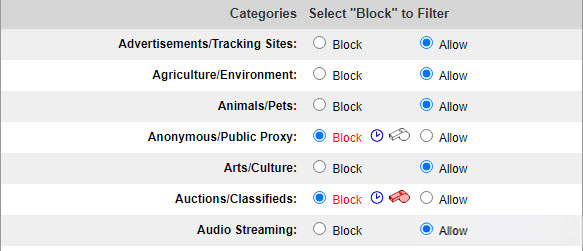
Block employee web access by category across hundreds of URL classifications. Configure per-user and per-group policy exceptions and maintain white and black lists without rebuilding your full policy.
Advanced Threat Protection
Block malware, phishing sites, spyware, and Trojans before they reach endpoints. SSL inspection provides visibility into encrypted HTTPS traffic where threats increasingly hide.
Real-Time Monitoring
Watch employee web activity live — by user, URL, and category. Identify bandwidth hogs the moment they appear and configure threshold alerts before consumption becomes a disruption.
Granular Filtering Controls
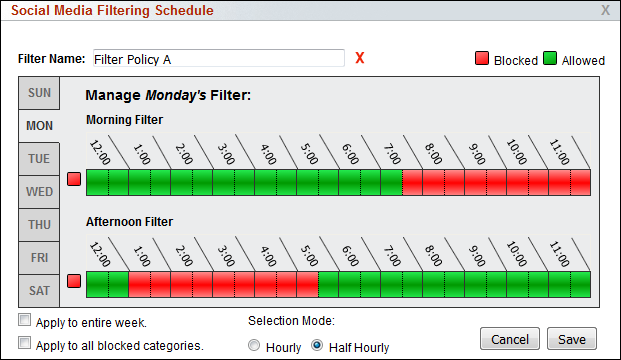
Schedule filtering by day and hour, enforce Safe Search across all browsers, block prohibited search terms, and control video streaming while allowing approved content — all from one policy interface.
Active Directory Integration
Enforce filtering policies by employee name and group, not IP address. AD integration means policies follow users regardless of which workstation they log in to.
Five Deployment Options
Deploy as Windows software, VMware virtual appliance, hardware appliance, cloud service, or hybrid. The same feature set and admin interface in every form factor — no capability trade-offs based on deployment choice.
Advanced Filtering That Goes Beyond Category Blocking
Most web filters block by category and stop there. CyBlock provides the controls IT actually needs to enforce real acceptable use policies — time-based schedules, SSL inspection, search enforcement, and per-user exceptions that do not require help desk involvement.
- Category-based filtering — Block or allow access by URL category with per-user and per-group exceptions built into policy.
- Filtering scheduler — Apply different rules by day, hour, or half hour. Relax restrictions at lunch while maintaining full enforcement during core hours.
- SSL inspection — Fully inspect HTTPS traffic to enforce policy over encrypted connections where threats and policy violations hide.
- Video streaming control — Block general video streaming platforms while allowing specific approved content or business-critical video services.
- Search term blocking — Prevent prohibited search terms from being submitted, reducing exposure to inappropriate content at the query level.
- Safe Search enforcement — Force Safe Search mode across all major browsers and search engines regardless of individual browser settings.
Five Ways to Deploy CyBlock — Same Features in Every Form Factor
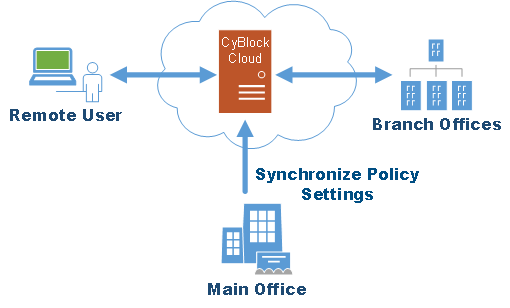
CyBlock fits the infrastructure you already have. All five deployment options share the same filtering engine, the same administration interface, and the same feature set. Deployment choice is an infrastructure decision, not a capability trade-off.
- Windows Software — Installs on an existing Windows server. Minimal infrastructure change with a straightforward upgrade path.
- VMware Virtual Appliance — Drop into your existing virtualization environment. No dedicated hardware required.
- Hardware Appliance — Rack-mount or mini turnkey units. Self-contained filtering with no server dependency.
- Cloud Service — Wavecrest-hosted. Protects remote and mobile users and reduces on-site infrastructure overhead.
- Hybrid — Local filtering with cloud overflow. On-site control with remote user coverage in one license.
CyBlock let us move from a one-size-fits-all block list to actual per-department policies. Our HR team has different web access needs than our ops staff, and now we handle that in policy — not in endless exception tickets.
Get Started with CyBlock
Tell us how we can help — someone from our team will follow up within one business day.
- Response within one business day
- No credit card required for a free trial
- Talk directly with someone who knows the product