
Monitor Employee AI Tool Usage
See how your employees are using generative AI tools at work, check that usage aligns with your company policy, and spot heavy or unusual AI activity that may put proprietary information at risk, all from your existing firewall logs.
AI tools are in your workplace whether you have a policy or not
Generative AI tools like ChatGPT, Copilot, Gemini, Grok, and Perplexity have become part of everyday work for many employees. Some organizations have embraced this and built policies around it. Many have not. Either way, employees are using these tools right now on company networks and company devices.
The risks are real and well documented. Employees sharing proprietary business data, customer information, or internal strategy with an external AI platform. Employees spending significant work time on personal AI projects unrelated to their role. AI tool usage that contradicts a written acceptable use policy the organization cannot actually enforce because it has no visibility into what is happening.
Most organizations have no clear picture of which AI tools employees are using, how frequently, for how long, or what that usage looks like over time. Without that baseline, writing a policy is straightforward. Enforcing one is not.
You cannot enforce an AI acceptable use policy you cannot measure. And you cannot measure AI tool usage without a monitoring solution that specifically tracks it. General web monitoring tools treat ChatGPT the same as any other website. Cyfin's AI category reporting gives you visibility specifically into generative AI access across your organization.
What every Cyfin customer can see
Regardless of which firewall you use, Cyfin provides core AI usage visibility that gives HR, management, and IT a clear picture of how AI tools are being accessed across the organization.
Which AI tools employees are accessing
Cyfin's AI category tracks all major generative AI platforms and identifies them by name in reports, not as anonymous technical domains.
Session duration and frequency
See how much time individual employees spend on AI tools each day, which tools they favor, and how usage patterns change over time.
Policy compliance reporting
Generate reports that show AI tool usage against your acceptable use policy, making it straightforward to identify employees whose behavior falls outside defined guidelines.
Organization-wide visibility
View AI usage by individual user, department, or the full organization. Identify which teams are heavy AI users and which are not engaging with tools at all.
Historical trend analysis
Track how AI tool adoption has grown across your organization over weeks and months. Useful for both policy enforcement and understanding how your workforce is evolving.
Human-only activity
Cyfin's noise filtering ensures AI usage reports reflect deliberate employee activity, not automated background connections that happen to touch AI platforms.
Ready to see your organization's AI activity?
Start a free trial or request a demo. No credit card required and nothing to install on employee devices.
Works with your existing firewall infrastructure







See complete session reports for every AI tool your employees use
Cyfin reads your existing firewall logs and delivers complete, human-ready reports covering all AI tool and service access across your organization. Available to every customer from day one, with any supported firewall.
No SSL inspection required. No agents to install. Works with your existing firewall.
See what employees are submitting to AI tools
If your firewall exposes AI-specific log data (such as Palo Alto Networks with its AI visibility add-on) and SSL inspection is enabled, Cyfin can go beyond session tracking to show you the actual content employees are submitting to AI tools.
Input and query visibility
When your firewall captures AI session detail at the application layer, Cyfin can surface what employees are submitting to AI tools, providing direct evidence of whether proprietary information is being shared.
Data exposure identification
With SSL inspection enabled and a firewall that supports it, move from suspecting that sensitive data may have been shared with an AI platform to having a specific, reviewable record of what was submitted and when.
Cyfin already gives you complete visibility into AI tool access (which tools employees use, how often, and for how long) using any supported firewall, with no SSL inspection required. The input and query visibility described above is the only piece that requires a firewall with AI-specific log fields and SSL inspection enabled. Not all firewall platforms offer this. Contact us if you want to understand what your current infrastructure supports.
What an AI usage report looks like
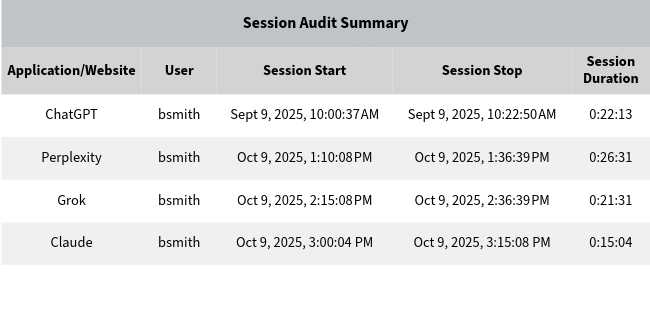
A Cyfin AI session report showing individual employee access to generative AI tools, including session duration and frequency. Reports are human-readable and ready to share with HR or management.
See a sample AI usage report
Enter your name and business email and we will send you a sample report. No credit card, no commitment.
Who uses this
You need to know whether employees are following your AI acceptable use policy and whether anyone is using AI tools in ways that put the organization at risk. Cyfin gives you that visibility in a report you can read and act on independently.
You need a clear picture of which AI platforms are being accessed on the company network and whether any usage patterns suggest data security concerns. Cyfin extends your existing firewall investment to provide that visibility without additional agents or infrastructure.
Frequently asked questions
Can Cyfin show me detailed session reports for AI tool usage?
Yes. Cyfin shows which AI tools and services each employee accesses, how often, and for how long, directly from your existing firewall logs. No SSL inspection or special firewall module required. You get complete, human-ready session reports for every AI tool your employees use from day one.
Can Cyfin see what employees type into ChatGPT?
It depends on your firewall. Cyfin's standard reporting shows which AI tools employees use, how often, and for how long, but not the text they enter. Seeing what an employee submitted to an AI tool requires a firewall that exposes AI-specific log fields, such as Palo Alto Networks with its AI visibility add-on, and SSL inspection must be enabled. If your firewall supports it, Cyfin can surface that detail.
Which AI tools does Cyfin track?
Cyfin's AI category covers the major generative AI platforms, including ChatGPT, Copilot, Gemini, Grok, and Perplexity, and identifies them by name in reports. We add support for new tools regularly. If you use one that is not yet covered, we can add it quickly.
Does this require SSL inspection?
No, not for standard AI usage reporting. Cyfin shows which AI tools are being used, by whom, and how often without SSL inspection. SSL inspection is only needed if you want to see the actual content employees submit to AI tools, and that also depends on firewall support.
Does it work without installing agents?
Yes. Cyfin is agentless. It works from your existing firewall logs, so there is nothing to install on employee devices.
Related reading
Get Started with Cyfin
Tell us how we can help. Someone from our team will follow up within one business day.
- Response within one business day
- No credit card required for a free trial
- Talk directly with someone who knows the product