
Employee Web Monitoring and Reporting from Your Existing Firewall Logs
Cyfin is agentless. It converts raw firewall log data into noise-free, human-only web activity reports, giving IT bandwidth visibility, HR the tools to conduct independent investigations, and compliance teams defensible business records, all without deploying anything on employee devices.
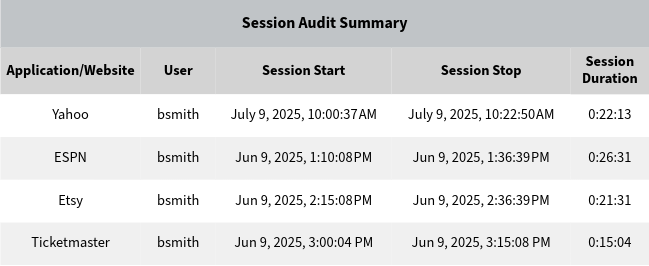
Your Firewall Logs Already Contain the Answers. They Just Aren't Readable.
Every enterprise firewall generates log data that records employee web activity in detail. The problem is that raw firewall logs are thousands of machine-level connection records: automated background traffic, software updates, cloud sync, and browser telemetry mixed together with actual employee browsing. Without processing, that data is unusable for IT reporting, HR investigations, or compliance documentation.
Most organizations either ignore the logs entirely or hand them to IT for manual interpretation, a slow, inconsistent process that delays HR investigations and produces results that depend on the skill of whoever ran the query.
Cyfin solves this by processing your existing firewall logs through a purpose-built filtering and reconstruction engine. Automated traffic is stripped out. Connection records are reassembled into readable browsing sessions. Employee names replace IP addresses. The result is a report that reflects what a person actually did, ready for IT dashboards, HR investigations, or compliance submissions without IT interpretation required.
What Cyfin Delivers Across IT, HR, and Compliance
Human-Only Reporting
Automated background traffic (software updates, cloud sync, browser telemetry) is identified and removed before any report is generated. Every data point in a Cyfin report reflects what a person actually did, not network noise.
Session Reconstruction
Hundreds of raw connection records are rebuilt into individual browsing sessions with a clear start time, duration, and site visited. One website visit appears as one readable event, not dozens of ambiguous log entries requiring IT interpretation.
IT Bandwidth Visibility
Identify which users, departments, and sites are consuming the most bandwidth. Trend reports surface bandwidth growth over time, top categories by consumption, and peak usage periods, giving IT the data to make informed capacity and policy decisions.
HR Self-Service Investigations
HR managers run investigation reports through a secure self-service portal without submitting requests to IT. IT configures access once. After that, HR initiates and receives investigation reports independently, the same day they're needed.
Compliance Documentation
Generate consistent, auditable documentation for CIPA, HIPAA, and acceptable use policy compliance. Cyfin reports are accurate, reproducible, and exportable in formats suitable for HR files, legal review, and compliance submissions.
Works With 60+ Firewalls
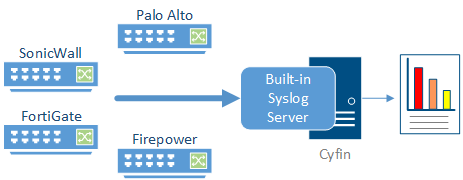
Palo Alto, Check Point, Cisco Firepower, Fortinet, SonicWall, WatchGuard, Zscaler, and many more. No endpoint agents. No network changes. Cyfin connects directly to your existing firewall infrastructure via syslog or log file and works with what you already have.
Works with your existing infrastructure







A Complete Library of Pre-Built Reports
Cyfin includes an extensive library of pre-built report templates covering every angle of employee web activity analysis, with no custom query writing or technical setup required.
- Top users by bandwidth, visits, and time: immediately identify the heaviest consumers in your organization by any metric.
- Top categories and sites: see which content categories and specific domains are driving activity across your user base.
- Department and group reports: aggregate activity by department, group, or organizational unit with Active Directory integration.
- Trend analysis: track bandwidth consumption and web activity over days, weeks, or months to identify patterns and growing problems.
- Session audit reports: reconstruct an individual employee's complete browsing history for HR investigations, with all sessions listed by time and duration.
- Microsoft 365 activity: OneDrive, SharePoint, and Teams access reporting alongside standard web activity.
Three Ways to Deploy, No Endpoint Agents Required
Cyfin integrates with your existing firewall infrastructure via syslog or log file export. There is nothing to install on employee workstations, no network topology changes, and no proxy configuration required.
- On-premises server: Cyfin installs on a Windows server in your network. Your firewall sends syslog data directly to the Cyfin server. Full data control, no outbound dependency for log processing.
- Virtual machine: Deploy as a VMware or Hyper-V virtual appliance in your existing virtualization environment. Same capabilities as the physical server option without dedicated hardware.
- Cloud-hosted service: Wavecrest hosts Cyfin in the cloud. Your firewall sends logs to a secure cloud endpoint. No server hardware to manage, no on-site infrastructure to maintain.
All three deployment options support the same firewall integrations, the same report library, and the same HR self-service portal. Deployment choice is an infrastructure decision, not a capability trade-off.
Common questions about Cyfin
Does Cyfin need to be installed on employee computers?
No. Cyfin is agentless. It works from the web activity logs your firewall or proxy already writes, so there is nothing to push to employee devices and nothing to keep updated there. HR and compliance get readable reports without an endpoint rollout.
Does Cyfin capture screens or keystrokes?
No. Cyfin does not capture screens, log keystrokes, or record audio or video. It reports which sites were visited and rebuilds them into readable sessions. Collecting less sensitive data means there is less to secure and less exposure to manage.
Who runs the reports, IT or HR?
IT configures Cyfin once. After that, HR, compliance, and managers run their own reports through a self-service portal, on their own schedule, without waiting on IT to pull and interpret raw logs.
We just completed a rigorous evaluation of Wavecrest Computing's web-access reporting product Cyfin. We found that Cyfin produces comprehensive information that can help managers quickly correct inappropriate or ineffective surfing.
Get Started with Cyfin
Tell us how we can help. Someone from our team will follow up within one business day.
- Response within one business day
- No credit card required for a free trial
- Talk directly with someone who knows the product