Syslog Firewall Employee Web-Use Log Analyzer
Greatly reduce the volume of data and simplify manager reports by using Cyfin’s proprietary algorithm that accurately identifies actual user clicks.
The Cyfin Difference
Extensive Report Library
- Large library of prebuilt reports.
- Start using impactful reports instantly.
- Easily distribute ready-to-use reports.
- Quickly create custom reports.
- Dramatically reduce time to analyze.
Identify Human Action
- See actual Web browsing activity.
- All background clutter is removed.
- Determine user time online.
- User behavior analytics.
Integration & Scalability
- Compatible with all popular firewalls.
- No third-party Syslog server required.
- Easy to scale system.
- Distributed architecture.
- NoSQL distributed database.
Secure Manager Self-Service Portal
- Secure reporting-only access portal.
- Report on authorized groups only.
- Deliver reports directly to managers.
- Interactive drill-down Option.
How does it all work?

Set Up Real-Time Import
Directly Syslog to Cyfin, no third party software delays.

Smart Engine Processing
Proprietary machine-learning algorithms that converts raw firewall connection data to actual Web browsing.

Set Up Visualizer & Report Delivery
Easily visualize your data by setting up custom dashboards. Most flexible scheduling & delivery options - HTML, PDF and CSV formats.

Automate & Collaborate
Getting the right information to the right people, in the right format, at the right time.
User Behavior Analytics
- Makes technical data easy to consume and manager-ready.
- Analyzes large volumes of data over long periods of time.
- Provides rapid and superior data insights.
- Tags associate related domains with friendly names.
Machine-Learning Behavior Analytics
Recognizable Name, not Ambiguous Domain Name.
- Unique feature that converts unclear domain activity into friendly site names.
- Today’s complex Websites utilize many different domains just to load a single page.
- Firewall reports view distinct domains as unique, even if they serve the same site.
- Managers want session duration by site name, not by ambiguous Domain Name.
The New Visualizer - Available Now!
- Visualize your data through highly configurable charts, tables, and more.
- Create multiple custom dashboard Tabs, each with a unique view and name.
- Connect to a variety of data sources, such as firewall, VPN, 365 and much more.
- View information on-the-fly with a simple change of time frame or a click to refresh.
- Focus the chart or table information as needed by adding or removing panel filters.
Easily Visualize Your Data
Productivity & Time Online
Managing Productivity & Session Time Online
- Application and Website reports with session duration.
- Monitoring productivity and usage of company web services.
- Easily see how much time users are spending online.
- See session time by friendly Website name, not by ambiguous Domain Name.
- Accurately identify actual user clicks, providing managers with clear, useful data.
Active Directory Integration
Seamless integration with Active Directory (AD) allows for secure and efficient management. Effortlessly integrate AD Departments, Companies, and Security Groups, and provide admin or manager access through AD. Access can be limited based on configured AD groups or departments.
Active Directory Integration
Directly connect Syslog-enabled devices.
Built-in Syslog Server
- Directly connect Syslog-enabled devices.
- No third-party Syslog server required.
- Supports virtually all Syslog-enabled gateways and firewalls.
- Easily create multiple Syslog servers.
- Each Syslog server can support a different type of gateway or firewall.
Cyfin Complete Insight into Internet and Cloud Service Activity
Dashboard

Top Categories Trend by Visits

Heatmap - Web Visits by Hour

Trend - User Visit Activity

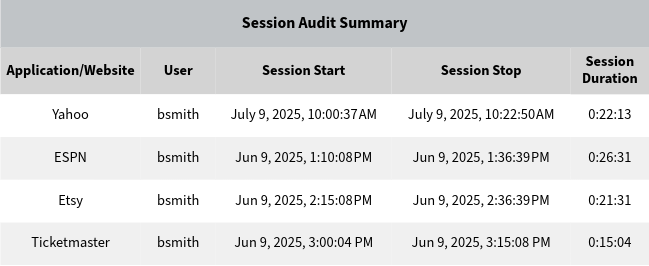
Table - User Session Audit Report

Pie Chart - Top App/Site by Time

Top Chart - Domains by Visits

Top Chart - User by Category Visits

Top Table - App/Site by Time

Top Table - User by Time

Table - User Audit Detail

Table - App/Site Audit Detail

Table - Audit - Search Terms

Pie Chart - Microsoft 365 Top Users

Top Chart - Microsoft 365 Top Operations

Table - Microsoft 365 OneDrive Audit

Table - Microsoft 365 User Logon Audit

Top VPN User Report

VPN User Audit Detail Report

Create easy-to-understand, detailed reports to share with stakeholders.
Managers Only See Actual User Web Browsing
- Create custom reports that provide management with exactly what they need.
- Accurately identify actual user clicks, providing managers with clear, useful data.
- Reduce the volume of information by showing managers only relevant data.
- True team collaboration is now possible with pertinent reports for all stakeholders.
- E-mail, print, share detailed reports via HTML, PDF and CSV formats.
Dashboard Charts
- Dashboard Home - Get a quick overview of your entire organization.
- Top Users - Quickly discover which users had the most activity.
- Top Time Online - Easily see how much time users are spending online.
- Top Categories - Quickly find out which categories had the most activity.
- Top Sites - Learn which sites had the most activity.
- Top Bandwidth - Find out which users & sites are hogging bandwidth.
Dashboard
Top Categories Trend
User Audit Report
Category Audit Report
Detailed and Comprehensive Audit Reporting
- Show activity by entire organization, groups, users, and categories.
- Get accurate, actionable, manager-ready detailed reports.
- Easily view the data from several angles and different perspectives.
- Dramatically reduce the time to analyze your organization's Web use.
- Comply with government and industry regulations such as CIPA and HIPAA.
Deeper Forensic-Level User Activity Analysis
- Complete view of every link a user clicks.
- See the exact search terms entered by users and their search time.
- Determine how much time a user spends online.
- Run an individual user report that details only Legal Liabilities Web use.
- View Web content most frequently visited by a user.
- Segment user activity by category acceptability classification.
User Search Terms Audit Report
User Legal Liability Report
Manager Access
Manager Access
- Scheduling and Distributing Reports:
- Send easy-to-read reports directly to managers.
- Reports are restricted to only the manager's defined group(s).
- Easily distribute reports manually or schedule for automatic distribution.
- Interactive capability allows managers to drill down without IT assistance.
- Secure Manager Self-Service Portal:
- Reporting-only access portal for managers and HR.
- Managers create reports on authorized groups without assistance from IT.
- IT assigns and maintains manager portal access privileges.
- Easy-to-read, manager-friendly, actionable dashboard.
Define Network Segments
- Assign IP address blocks based on remote VPN users and guest WiFi.
- Easily define a unique segment definition by hostname, IP range or subnet.
- Report on specific segments through dashboard charts or actual reports.
- Create a specific low-level filter or run a report with a global-level segment filter.
Network Segments
Choose the Right Cyfin Deployment
Cyfin Virtual Deployment Options
- Reporting and analytics for any business size or type.
- Includes the new Visualizer and supports easy connection to a variety of data sources.
- Complete employee monitoring and reporting solution.
- Highly scalable and easy-to-expand VM resources.
- Supports VMware, Microsoft Hyper-V and Container environments.
- VMware OVA VM Template. Easily add and launch in any VMware system.
- Windows Hyper-V Installer. Easy windows installer - just install and go.
Cyfin Cloud Deployment Option
- Includes the same functionality as the virtual solution.
- Includes the new Visualizer and supports easy connection to a variety of data sources.
- Cloud-based reporting and analytics for any business size or type.
- Deploy in minutes with simple, intuitive steps.
- No additional cost for hardware, software, and no ongoing maintenance.
- Our data center is state-of-the-art SSAE 18, SOC 3, SOC 2 certified.
- HIPAA and HITECH audited infrastructure.
Even More Cyfin Differences
View Cloud-Based Service Activity
- Microsoft 365 Reporting
- Identify risk and analyze usage.
- Expose unsanctioned services.
- Prevent the loss of sensitive data.
VPN and IP Segment Monitoring
- See VPN user presence.
- Identify VPN logon and logoff activity.
- Assign IP segments for VPN or WiFi.
- Report on specific IP segments.
Team Collaboration
- Right information to the right people.
- Make informed, collaborative decisions.
- Both human action & technical issue.
- Involves all aspects of business.
Policy and Compliance
- Verify employee policy compliance.
- Observe patterns for lost productivity.
- Flag possible legal liability issues.
- Stay CIPA and HIPAA compliant.
Suggested Resources
Sign up for a custom Cyfin demo.
Thank you! We will be in touch within one business day.
Once your request is processed, a product specialist will contact you to better understand your goals and schedule a custom product demo.
In the meantime, please feel free to watch our demo video below.
Cyfin Demo Video
What our customers are saying about Cyfin:
Our purchase of the Wavecrest Cyfin product was a success for us. We needed the ability to view, report and allow us to enforce all URL traffic from BOTH our Windows traffic as well as our MAC users traffic. The reporting is awesome. And I have to say the few times I’ve needed tech support, they are on it. I’ve been working in IT for over 20 years and have never had such headache free support. Their knowledge of the product is unsurpassed, and their near instant response is unheard of in todays environment. Anybody else, I cringe at the idea of making a tech support call, but with Cyfin, if you call or email you better be prepared to get an immediate response. And if it is too quick for you, scheduling for you convenience is not a problem. Hats off to tech support. Highly recommended product."
–System Administrator, Healthcare Industry
Why Us
- Industry Leader Since 1996 – Stability, Experience, and Knowledge.
- Global Customer Base – Customers on every continent except Antarctica.
- The Right Focus – Concentrating on The Human Factor.
- Best-of-Breed Products – Visibility, Compliance, Security, and Productivity.
- Exceptional Support – Dedicated, Effective, and Responsive Support.
- Best Value in Key Areas – Functionality, Price, Support, and Customer Service.