
See Which AI Tools Your Employees Are Using
Cyfin reads your existing firewall logs and shows you which AI tools and services each employee accesses, how often, and for how long — directly from your existing infrastructure, with no agents to install and no SSL inspection required.
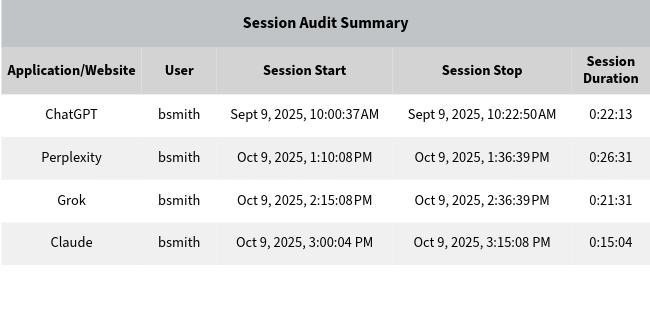
Your Employees Are Using AI Tools. Do You Know Which Ones, and How Often?
Generative AI adoption across the enterprise has outpaced most organizations' ability to govern it. Employees are using ChatGPT, Gemini, Microsoft Copilot, Claude, Grok, Perplexity, and dozens of other AI services from company devices every day — often before any formal policy exists about which tools are approved.
Without visibility, you cannot answer the questions HR, compliance, and leadership are beginning to ask: Which AI platforms are in use? How much work time is being spent on AI? Is usage concentrated in specific departments or roles? Is anyone using AI services outside the approved list?
Cyfin answers these questions directly from the firewall logs you already collect. There is nothing new to install, no changes to your network, and no SSL inspection required for standard AI usage reporting. If your firewall logs outbound web activity, Cyfin can report on employee AI tool usage today.
What Cyfin Shows You About Employee AI Activity
Which AI Tools Are in Use
Identify every AI tool and service employees access — ChatGPT, Gemini, Microsoft Copilot, Claude, Grok, Perplexity, and others — by reading domain and traffic patterns from your firewall logs.
Usage Frequency and Session Duration
See how often each employee accesses AI tools and how long each session lasts. Identify heavy users, spot unusual access patterns, and compare usage across teams and departments.
Human-Only Session Reporting
Cyfin's Smart Engine filters out automated background traffic before reporting. Every AI session in your report reflects a real employee interaction — not API calls, browser prefetch, or automated scripts.
AI Policy Compliance Reports
Generate reports that compare actual AI tool usage against your acceptable use policy. Identify employees accessing unapproved platforms and produce documentation suitable for HR review.
Usage Trends Over Time
Track AI adoption trends across your organization over weeks or months. See whether usage is growing, shifting between tools, or concentrated in specific roles — before it becomes a policy or security concern.
Works With Your Existing Firewall
Cyfin connects to your existing syslog stream — no new infrastructure, no endpoint agents. Standard AI usage reporting requires no SSL inspection. Compatible with Palo Alto, Fortinet, SonicWall, Check Point, Cisco, WatchGuard, Zscaler, and more.
Works with your existing infrastructure


We just completed a rigorous evaluation of Wavecrest Computing's web-access reporting product Cyfin. We found that Cyfin produces comprehensive information that can help managers quickly correct inappropriate or ineffective surfing.
Common Questions
How do I see which AI tools my employees are using?
Cyfin reports which AI tools employees access, how often and by whom, using the firewall logs you already have. No agents are installed, and SSL inspection is not required for standard AI usage reporting.
Is there a tool that monitors AI usage before it hits our network?
Cyfin reports on AI use from the logs your firewall writes as traffic passes through it, so it shows which AI tools were used and by whom; it does not block or intercept requests before they leave the network. Blocking AI tools in advance is done by a web filter or firewall policy, and Cyfin's reports show which tools that policy should cover.
Which AI tools can Cyfin identify?
Cyfin identifies ChatGPT, Gemini, Microsoft Copilot, Claude, Grok, Perplexity and other AI services by reading domain and traffic patterns in your firewall logs.
Do I need SSL inspection to report on AI usage?
No, not for standard AI usage reporting: which tools were used, by whom, how often and for how long. Seeing what was typed into an AI tool depends on your firewall logging that content, which generally requires SSL inspection on the firewall.
Can Cyfin show who is using unapproved AI tools?
Yes. AI policy compliance reports compare actual AI tool usage against your acceptable use policy and identify employees accessing platforms outside the approved list.
Do I need to install anything on employee devices?
No. Cyfin is agentless. It reads your existing firewall logs, so there is nothing to install on employee devices and no change to your network.
Get Started with Cyfin
Tell us how we can help. Someone from our team will follow up within one business day.
- Response within one business day
- No credit card required for a free trial
- Talk directly with someone who knows the product