
Control and Report on Employee AI Use
Block or allow ChatGPT and other AI tools by user or group, capture the prompts employees submit, and get built-in reports on which AI tools people use and for how long. All in CyBlock, from Wavecrest Computing.
What CyBlock does for AI use
CyBlock, from Wavecrest Computing, is a web security gateway that lets organizations block, allow, and report on employee use of generative AI tools such as ChatGPT. It identifies AI tools by name through its Artificial Intelligence category and App-Site Tags for specific AI vendors, applies policy by user or group, captures the prompts employees submit, and includes built-in AI usage reports. CyBlock runs as Windows software, a hardware appliance, a cloud service, or a hybrid, and policy can follow users in the office or remote.
Employees are already using AI tools at work. You cannot enforce an AI acceptable use policy you cannot measure, and you cannot measure it with raw logs that list obscure domains instead of named tools. CyBlock puts control and reporting in one product, so the same policy that decides what is allowed also produces the record of what happened.
Block or allow AI tools by user or group
CyBlock enforces policy at request time, before a page loads.
- Artificial Intelligence category: block or allow generative AI tools as a group.
- App-Site Tags: identify specific AI vendors, such as ChatGPT, so you can treat individual tools differently.
- Per-user and per-group policy: allow approved AI tools for the teams that need them and block them for others.
- Allow and block lists, and schedules: fine-tune policy for your organization and time of day.
- Every attempt logged: allowed and blocked attempts are recorded and appear in your reports.
See which AI tools employees use, and for how long
CyBlock comes with all of the employee web-use and AI reporting found in Cyfin, Wavecrest's reporting product, in the same product that filters AI tools. Reports are human-focused: background noise is filtered out, so managers and HR can read them without decoding raw logs.
- AI tools by user: named AI apps, not obscure domains, and who used them.
- Time spent: session duration and frequency by user, group, or AI tool.
- Trends: AI adoption and spikes over weeks and months.
- Forensic-level user detail: drill down from a summary to one person's sessions, URLs, and timestamps.
- Scheduled reports: emailed daily, weekly, or monthly to managers and HR.
- Visualizer dashboards: self-service access for managers, with no ticket to IT.
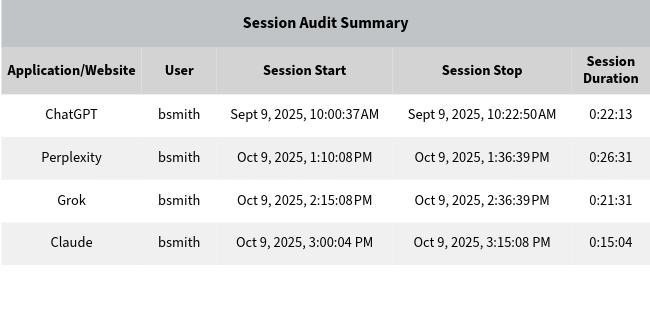
An AI session report showing one employee's sessions in ChatGPT, Perplexity, Grok, and Claude, with start time, stop time, and duration.
See what employees submit to AI tools
CyBlock captures the prompts employees type into AI tools at the gateway. Prompt reports show what was submitted, who sent it, when, and to which tool, in the same product that filters AI tools and reports on their use. There is no separate firewall module to buy.
Prompt capture uses SSL inspection, which CyBlock supports. We will walk through it with you on a demo or trial.
AI policy for employees at home, traveling, or at other locations
Many organizations keep their firewall on-premises while employees work from home, travel, or work at other locations. CyBlock Cloud delivers CyBlock's filtering and reporting as a cloud service, so the same AI policy and the same reports follow employees wherever they work, with no need to route their traffic back through the office.
- One policy everywhere: block or allow AI tools the same way in the office, at home, and on the road.
- One set of reports: AI use by every employee, whether they were in the office or not.
- Hybrid option: combine on-premises and cloud deployment under one policy.
Common ways to manage AI use at work
Organizations usually manage employee AI use in one of four ways. They differ in whether they can block AI tools, how they report, and whether they install software on every computer.
| Approach | Blocks or allows AI tools | AI usage reports | Prompt detail | Software on every computer |
|---|---|---|---|---|
| Web security gateway (CyBlock) | Yes, by user or group | Built in | Yes | No |
| Firewall AI add-on module | Depends on firewall model and license | Depends on firewall | Depends on firewall model and license | No |
| Endpoint monitoring agent | Varies by product | Yes | Varies by product | Yes |
| Firewall log reporting (Cyfin) | Through your firewall | Yes | When the firewall logs it | No |
Which Wavecrest product fits?
Customers choose one or the other. Each is a complete solution for managing employee AI use, and both give HR and managers reports they can read. The right choice depends on one question:
Does your firewall already handle web filtering and SSL inspection for every employee, wherever they work?
No: choose CyBlock for filtering, SSL inspection, and all of Cyfin's reporting in one product
Best when your firewall does not provide web filtering or SSL inspection, or lacks the capacity to run them, or when employees work from home, travel, or work at other locations and you want filtering and reporting that follow them.
- Comes with all of Cyfin's employee web-use and AI reporting: reports HR and managers can read, scheduled reports, and Visualizer dashboards
- Block or allow ChatGPT and other AI tools by user or group
- Its own SSL inspection, so it can capture the prompts employees submit to AI tools
- CyBlock Cloud delivers filtering and reporting as a cloud service for employees at home, traveling, or at other locations, with no need to route traffic back through the office
Yes: choose Cyfin to add employee reporting to the firewall you already have
Best when a firewall such as Palo Alto Networks, Fortinet FortiGate, or Check Point already handles filtering and application control.
- Firewall reporting is built for IT; Cyfin adds reports written for HR and non-IT managers
- Which AI tools each employee uses, how often, and for how long
- Nothing installed on employee devices and no change to how traffic flows
- Works with Palo Alto Networks, Cisco, Fortinet FortiGate, Check Point, SonicWall, WatchGuard, and Zscaler
Who uses CyBlock for AI control
Enforce an AI or acceptable-use policy at the gateway, without a firewall add-on or a second reporting product.
Read clear reports on AI tools, time spent, prompts, and blocked attempts, delivered on a schedule or through Visualizer dashboards.
Wavecrest Computing has provided web filtering and employee web-use reporting since 1996. CyBlock is an established product with AI category control, AI usage reports, and prompt capture, backed by U.S.-based support.
Frequently asked questions
How do I block ChatGPT at work?
CyBlock blocks ChatGPT and other generative AI tools through its Artificial Intelligence category and App-Site Tags for specific AI vendors. You can block AI tools for everyone, allow approved tools for specific users or groups, and set schedules. Blocked attempts are logged and appear in reports.
Can I see which employees use AI tools, and for how long?
Yes. CyBlock includes AI usage reports that show named AI tools, the users who accessed them, sessions, time spent, and trends over weeks and months. You can drill down from a summary to one person's sessions, URLs, and timestamps. Reports can be scheduled to managers and HR, or viewed in Visualizer dashboards.
Can CyBlock show what employees type into AI tools?
Yes. CyBlock captures the prompts employees submit to AI tools at the gateway. Prompt reports show what was submitted, who sent it, when, and to which tool. We will walk through setup for your network on a demo or trial.
Does CyBlock need software installed on every computer?
No. CyBlock is a web security gateway, not an agent on every endpoint. It runs as Windows software, a hardware appliance, a cloud service, or a hybrid, and policy can follow users in the office or remote.
Can CyBlock cover employees who work from home or travel?
Yes. CyBlock Cloud delivers CyBlock's filtering and reporting as a cloud service, so the same AI policy and reports follow employees at home, traveling, or at other locations, with no need to route their traffic back through an on-premises firewall.
Do I need a separate reporting product?
No. CyBlock comes with all of Cyfin's employee web-use and AI reporting, in the same product that filters AI tools. There is nothing extra to download or buy.
Do I need both CyBlock and Cyfin?
No. Customers choose one or the other, and each is a complete solution. CyBlock comes with all of Cyfin's reporting, plus web filtering, SSL inspection, and AI prompt capture, and CyBlock Cloud delivers it as a cloud service for employees wherever they work. Cyfin adds employee-focused reporting to a firewall that already handles filtering. The right choice depends on what your firewall already does.
What is the difference between CyBlock and Cyfin for managing AI use?
CyBlock is a web security gateway. It blocks or allows AI tools, runs its own SSL inspection to capture the prompts employees submit, and comes with all of Cyfin's employee web-use and AI reporting. CyBlock Cloud provides the same filtering and reporting as a cloud service for employees at home, traveling, or at other locations. Cyfin is reporting software for organizations whose firewall already handles filtering. It turns firewall logs into AI and web-use reports that HR and non-IT managers can read, with nothing installed on employee devices. Choose CyBlock if your firewall does not provide web filtering or SSL inspection, lacks the capacity to run them, or does not cover employees who work outside the office. Choose Cyfin if your firewall already handles filtering for your workforce.
Who makes CyBlock?
CyBlock is made by Wavecrest Computing, which has provided web filtering and employee web-use reporting since 1996. Support is U.S.-based.
Related reading
Get Started with CyBlock
Request a demo or start a free trial. Someone from our team will follow up within one business day.
- Response within one business day
- Free 14-day CyBlock Cloud trial
- U.S.-based support