
Squid Proxy Log Analyzer and Web Use Reports
Cyfin is a Squid log analyzer: it reads Squid proxy access logs and turns them into readable, human-only employee web use reports for HR and IT, with no agents on employee devices.
What Is a Squid Log Analyzer?
Squid writes a line to its access log for every request it handles: images, scripts, ads and background updates as well as the pages a person chose to open. A Squid log viewer shows those lines as they are. A Squid log analyzer turns them into reports. Cyfin goes a step further for employee web use: it filters out automated background traffic, groups the remaining requests into browsing sessions and shows recognizable site names and time online, so HR, managers and IT can see what a person actually browsed without reading raw proxy logs.
How Cyfin Reads Squid Access Logs
- Squid and Common formats: Cyfin reads Squid proxy logs in both the native Squid format and the Common log format.
- Where Cyfin runs: separately from the Squid server, as a virtual machine (VMware or similar, or Microsoft Hyper-V), an AWS Amazon Machine Image, a Docker container, or a Wavecrest cloud service.
- Getting the logs to Cyfin: schedule the Squid log files to be transferred to Cyfin by FTP, or place them on a mounted network drive Cyfin can access.
- No agents: Cyfin only needs the log files. Nothing is installed on employee devices.
What the Reports Show
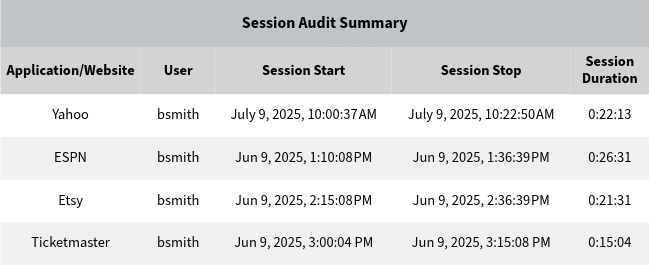
Cyfin's reports show which sites each person visited, when, and for how long, with one line per real visit instead of dozens of raw log entries. Reports can be scheduled for managers and HR, and Active Directory integration lets them show employee names. The sample below shows a session report of the kind Cyfin builds from proxy logs.
Company Overview
Squid is based on the Harvest Cache Daemon developed in the early 1990s. The Squid project was funded by an NSF grant that covered research into caching technologies. Released in 1996, Squid is a Web proxy cache server application that provides proxy and cache services for HTTP, HTTPS, FTP, and other popular network protocols. It reduces bandwidth and improves response times by caching and reusing frequently requested Web pages. Squid is provided as free, open source software and was designed to run on Unix-based systems, but can also be run on Windows machines.
Cyfin - Squid Proxy Configuration

Cyfin runs separately from the Squid server and reads the Squid log files.
Log File Setup
Log File Type: Squid Proxy
Default Directory: [InstallPath]\wc\cf\log
NOTE: Squid and Common formats are both supported.
Configuration Notes
If your log file configuration results in an error, please check your directory path and make sure it is the one that contains your actual log files.
FTP Configuration Notes
If your log files are currently being FTPed, determine the destination server/directory, then schedule the Squid log files for FTP transfer to your Cyfin system.
Cyfin needs access to the Squid log files in order to run reports. You can either FTP them to Cyfin, or put them on a mounted network drive that Cyfin can access. We recommend scheduling the log files to be FTPed to Cyfin for the least amount of strain on your network.
Common Questions
What is a Squid log analyzer?
A Squid log analyzer reads the access logs that a Squid proxy writes and turns them into reports. Cyfin is a Squid log analyzer built for employee web use reporting: it rebuilds Squid access log entries into human-only reports that HR, managers and IT can read.
Can Cyfin read Squid access logs?
Yes. Cyfin reads Squid proxy logs in both the Squid and Common log formats. Cyfin runs separately from the Squid server and receives the log files by FTP or reads them from a mounted network drive.
Does Cyfin need agents on employee computers?
No. Cyfin only needs access to the Squid log files. Nothing is installed on employee devices.
How is Cyfin different from a Squid log viewer?
A log viewer shows raw access log lines. Cyfin filters out automated background traffic, groups requests into browsing sessions and shows recognizable site names and time online, so the report reflects what a person actually browsed.
Can I try Cyfin with my own Squid logs?
Yes. A free Cyfin trial is available with no credit card required, and you can run it against your own Squid log files.

