
Forcepoint (Websense) Log Analyzer and Reports
Cyfin is a Forcepoint (Websense) log analyzer: it reads the Forcepoint log database and turns it into accurate, human-only employee web use reports for HR, compliance and management, with no agents on employee devices.
Websense Is Now Forcepoint
If you are looking for Websense reporting or a Websense log analyzer, this is the right page. Forcepoint was formed in 2015 when Raytheon Cyber Products and Websense merged, so Websense web security products are now part of Forcepoint. Cyfin reads Forcepoint (Websense) log data and turns it into employee web use reports that HR and managers can read. Cyfin is a reporting product: it does not filter web traffic or replace your Forcepoint gateway. The setup steps further down this page cover Full URL Logging and the details Cyfin needs to connect to the Forcepoint log database.
Company Overview
Websense was founded in 1994 as NetPartners, a commercial reseller of firewalls and other network security products. Two years later, it introduced its first software product to help customers manage employee use of the Web, and in 1999, the company adopted the name Websense. Forcepoint was formed in 2015 through the merger of Raytheon Cyber Products and Websense. Its products address the cybersecurity challenges and regulatory requirements facing businesses and government agencies and provide cloud security, data and insider threat security, network security, and global government security.
Cyfin - Forcepoint (Websense) Configuration
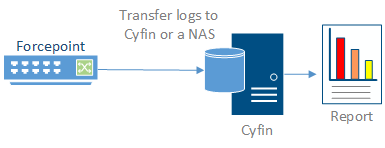
Cyfin is installed on a server, not on the Forcepoint (Websense) appliance.
Log File Setup
Log File Type: Websense
Forcepoint Configuration Steps
In order to connect to Forcepoint, you will need to have Full URL Logging configured in your Forcepoint (Websense) product. To enable Full URL Logging, follow the instructions below:
- Go to the Full URL Logging section of the Reporting - Log Database page (Settings tab).
- Select Record full URL of each site requested to log the entire URL, including the domain (www.domain.com) and the path to the particular page (/products/productA.html).
- Click Save Now to activate changes to the full URL logging options.
Cyfin Configuration Notes
The following information is needed for Cyfin to connect to Forcepoint (Websense) logs. You will need to have this information ready before moving forward.
- Server Name
- Database
- Port
- User Name
- Password
Common Questions
Is Websense now Forcepoint?
Yes. Forcepoint was formed in 2015 through the merger of Raytheon Cyber Products and Websense, so Websense web security products are now part of Forcepoint.
Can Cyfin analyze Forcepoint (Websense) logs?
Yes. Cyfin is designed to work with Forcepoint (Websense) models. It is installed on its own server, not on the Forcepoint appliance, and reads the Forcepoint log database.
What do I need to set up in Forcepoint for Cyfin?
Full URL Logging must be enabled in Forcepoint: on the Reporting - Log Database page, select Record full URL of each site requested. Cyfin then connects to the log database with the server name, database, port, user name and password.
Does Cyfin replace the Forcepoint gateway?
No. Cyfin is a reporting product and does not filter web traffic. It turns the logs your Forcepoint system already records into employee web use reports that HR and managers can read.
Does Cyfin need agents on employee computers?
No. Cyfin reads the log data Forcepoint already keeps, so nothing is installed on employee devices.

